
Dengan Aplikasi ini anda dapat mengatur kecepatan koneksi dan komputer anda serta ke stabilan koneksi yang lambat serta mempercpat memory ...
Dengan Aplikasi ini anda dapat mengatur kecepatan koneksi dan komputer anda serta ke stabilan koneksi yang lambat serta mempercpat memory RAM (ramdom acces memory) yg agak kecil.

Pertama-tama kalian harus gunakan software tambahan saya, gunanya untuk meringankan memory komputer anda download disini GameBOaster.....
Selanjutnya
cara untuk Mozilla Fire Tune Sbg brikut...
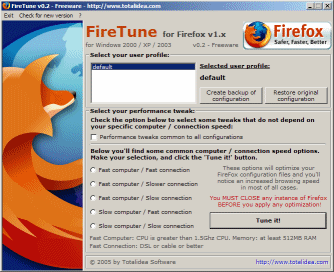
Pilihan kecepatan untuk komputer anda
dan FireTune akan mengoptimalkan Firefox sesuai dengan pilihan Anda.
restart komputer bila perlu
untuk informasi
FireTune akan mengoptimalkan beberapa pengaturan untuk melakukan browsing dengan performa yang lebih baik , sesuai dengan kebutuhan komputer dan koneksi internet anda.
Menggunakan aplikasi ini tdk perlu pintar karena hanya memilih beberapa pilihan di firetune
FireTune mendukung Mozilla Firefox versi 1.x, 2.x dan 3.x.
download di : firetune
kmudian klik Mirror 1 ketika sampai di alamat downloadnya
untuk mendapatkan versi firetune silahkan kunjungi totalidea
FireTune for Firefox optimizes Firefox's performance on your computer by allowing you to configure its speed and connection settings. However, we found little or no difference in our computer's performance after we put it to the test.
Right off the bat, we noticed that some of the features this add-on includes, such as the autocompletion of URLs, are features that Firefox already has built into in its current version. It does, however, allow you to set up other optimization features, such as the caching of objects shared over a secure connection, autocomplete for URLs, and optimization of memory usage. The application allows users to "tune" their Firefox by choosing from a list that includes information about how fast your computer and connection is. We tried "Fast Computer, Slower Connection," because we are using a new laptop with a DSL connection. We didn't notice any obvious changes in the performance of Firefox on our computer when we used this program, versus usage of Firefox without it. This add-on might be useful to users with slower computers and connections.
FireTune installs and uninstalls easily on your computer. And since it's free, there's no harm in giving the program a try, especially if you are experiencing performance problems with Firefox, connection problems, or if you are using an older or slower computer. Zikra Blog
Pertama-tama kalian harus gunakan software tambahan saya, gunanya untuk meringankan memory komputer anda download disini GameBOaster.....
Selanjutnya
cara untuk Mozilla Fire Tune Sbg brikut...
Pilihan kecepatan untuk komputer anda
dan FireTune akan mengoptimalkan Firefox sesuai dengan pilihan Anda.
restart komputer bila perlu
untuk informasi
FireTune akan mengoptimalkan beberapa pengaturan untuk melakukan browsing dengan performa yang lebih baik , sesuai dengan kebutuhan komputer dan koneksi internet anda.
Menggunakan aplikasi ini tdk perlu pintar karena hanya memilih beberapa pilihan di firetune
FireTune mendukung Mozilla Firefox versi 1.x, 2.x dan 3.x.
download di : firetune
kmudian klik Mirror 1 ketika sampai di alamat downloadnya
untuk mendapatkan versi firetune silahkan kunjungi totalidea
FireTune for Firefox optimizes Firefox's performance on your computer by allowing you to configure its speed and connection settings. However, we found little or no difference in our computer's performance after we put it to the test.
Right off the bat, we noticed that some of the features this add-on includes, such as the autocompletion of URLs, are features that Firefox already has built into in its current version. It does, however, allow you to set up other optimization features, such as the caching of objects shared over a secure connection, autocomplete for URLs, and optimization of memory usage. The application allows users to "tune" their Firefox by choosing from a list that includes information about how fast your computer and connection is. We tried "Fast Computer, Slower Connection," because we are using a new laptop with a DSL connection. We didn't notice any obvious changes in the performance of Firefox on our computer when we used this program, versus usage of Firefox without it. This add-on might be useful to users with slower computers and connections.
FireTune installs and uninstalls easily on your computer. And since it's free, there's no harm in giving the program a try, especially if you are experiencing performance problems with Firefox, connection problems, or if you are using an older or slower computer. Zikra Blog


